
Posture
IdP
IAM Engineer

Find every account bypassing SSO and close the gap before attackers use it to stay invisible

Quick summary: Siloed software deployments often allow users to create direct, unmonitored local application credentials that bypass central authentication rules entirely. Deploying Oleria Trustfusion, an AI-native identity security platform, introduces robust identity security posture management to detect these hidden entries. This unified graph engine checks application databases against your central user directories, flags unmapped administrative accounts, and exposes active backdoors to ensure zero shadow access remains outside your defensive perimeter.

Outcome

Security and IT teams gain a continuously maintained, application-level view of SSO adoption across every connected application — identifying every account that authenticates with local credentials rather than going through the corporate identity provider. SSO coverage rate is tracked as a measurable posture metric per application and across the full environment. Accounts bypassing SSO are surfaced as posture findings, prioritized by privilege level, and driven to remediation through structured campaigns — closing the authentication control gap that local accounts create.

Why SSO bypass is a security problem, not just an IT preference:  When a user authenticates to a SaaS application with a local username and password instead of going through Okta or Entra ID, your IDP's controls do not apply. MFA enforcement, conditional access policies, session management, single-click deprovisioning, and authentication anomaly detection — none of these reach local accounts. A privileged user with a local account in Salesforce or Snowflake is effectively operating outside your identity security perimeter. And in most organizations, that population is larger than anyone realizes.

Why this is hard without Oleria

SSO enforcement sounds like a solved problem — configure the IDP, flip the SSO-required setting, done. In practice, achieving and maintaining complete SSO coverage across a real SaaS environment is considerably harder, and the gap between assumed coverage and actual coverage is consistently wider than security teams expect:

· No cross-application SSO coverage view.  Each SaaS application tracks authentication method within its own admin console. There is no native mechanism that aggregates, across every connected application, which accounts are authenticating via SSO and which are using local credentials. Producing even a rough SSO coverage picture requires manually checking each application — a process that is slow, incomplete, and immediately stale.

· Local accounts are created faster than SSO policies close them.  Local accounts accumulate through provisioning shortcuts, break-glass access requests, legacy integrations, onboarding workarounds, and application-level admin configurations that bypass IDP federation. Even with an SSO-required policy in the IDP, applications that allow local credential creation as a fallback silently grow a local account population that the IDP never sees.

·  SSO enforcement settings vary by application and configuration.  Many SaaS applications support SSO enforcement — a setting that prevents any authentication other than IDP federation — but it is not always enabled by default, not always applied consistently to all user tiers, and sometimes has exceptions carved out for admin accounts or API users. Without visibility into per-application enforcement configuration, teams cannot know whether SSO is actually required or merely available.

·  Privileged local accounts are the highest-risk gap and the least visible.  Standard user local accounts are a hygiene issue. A Salesforce System Administrator or a Snowflake ACCOUNTADMIN authenticating with local credentials is a critical security gap — the highest-privilege access in the environment, operating entirely outside IDP control. These accounts are rarely surfaced by any native admin console view focused on SSO enrollment rates.

·  IDP user counts do not reveal local account populations.  An organization with 500 Okta users and 500 Salesforce licenses might assume close to 100% SSO coverage. In reality, Salesforce may have 550 active accounts — the extra 50 created directly in Salesforce, authenticating locally, visible only to the Salesforce admin. Without cross-system reconciliation, this population is invisible from the IDP side.

·  Offboarding leaves local accounts active.  When an employee is offboarded through the IDP — their Okta or Entra ID account deactivated — their local SaaS accounts often remain active. The IDP-triggered deprovisioning workflow only reaches applications that authenticate through the IDP. Local accounts in applications where the user bypassed SSO persist indefinitely after the employment relationship ends.

What Oleria delivers

Oleria Trustfusion ingests account and authentication pathway data from every connected application and IDP, identifies which accounts authenticate via SSO and which use local credentials, and surfaces SSO coverage posture as a continuously maintained metric and finding set — with prioritization by privilege tier, application, and identity type.
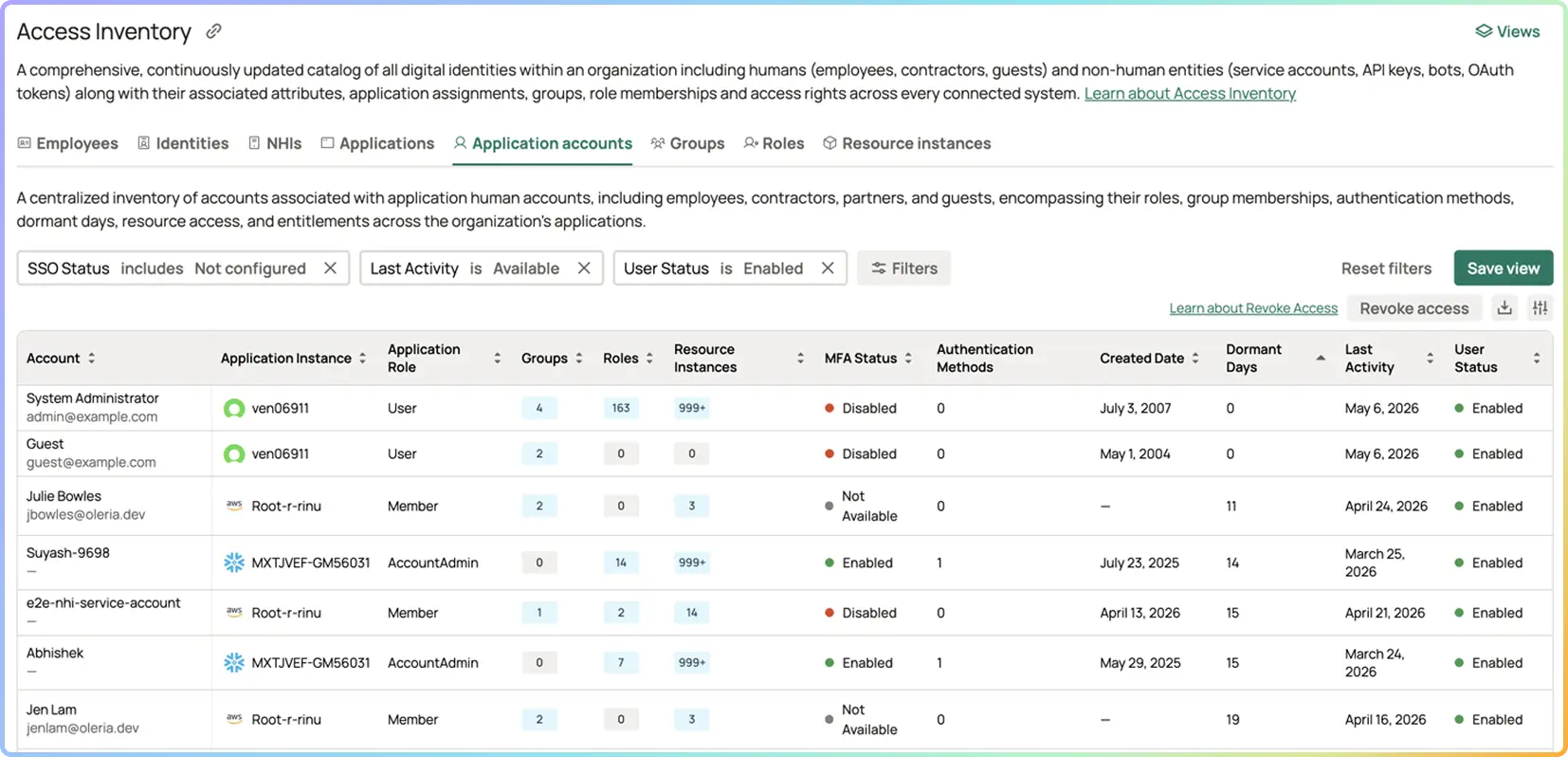
SSO vs. local account classification per account.

For every account in every connected application, Oleria identifies the authentication pathway: IDP-federated via SSO, or local credentials. This classification is derived from connector data — whether the account is linked to an IDP identity, whether the application reports the account as SSO-enabled, and whether the account's email domain matches a federated domain in the IDP. Every local account in every connected application is identified and recorded in the Access Graph.

SSO coverage rate as a posture metric

Trustfusion calculates SSO coverage rate per application — the percentage of active accounts authenticating through the corporate IDP — and across the full environment. Coverage rate is tracked over time and surfaced in the Posture Dashboard, enabling security and IT leadership to measure progress toward full SSO enforcement and identify which applications lag behind.

Privileged local account detection.

Local accounts that hold privileged roles or permissions in any connected application are identified and surfaced as the highest-priority SSO posture findings. A local admin account in Salesforce, GitHub, or Snowflake that bypasses IDP authentication entirely is a critical finding — the combination of high privilege and no IDP control represents the worst-case authentication posture gap in the environment.

Local account population beyond IDP visibility.

Oleria reconciles the account population in each SaaS application against the IDP's known user records. Accounts present in a SaaS application but absent from the IDP — the accounts that IDP-centric tools cannot see — are surfaced as out-of-IDP-scope findings. These are the accounts most likely to persist through offboarding gaps and the ones most likely to lack any centralized authentication control.

SSO enforcement configuration visibility.

Where SaaS application connectors expose enforcement configuration data, Oleria surfaces whether SSO enforcement is enabled for the application — distinguishing between applications where SSO is available but optional, and applications where local credential authentication has been blocked at the application level. Applications with SSO available but not enforced are flagged as posture gaps even if current local account counts are low.

Post-offboarding local account persistence detection.

Oleria cross-references each local account against HR and IDP status. Local accounts in SaaS applications whose corresponding IDP identity has been deactivated — or whose HR record shows a termination date — are surfaced as active-after-offboarding findings. These are the accounts that IDP deprovisioning workflows silently missed.

Continuous monitoring and new local account detection.

SSO coverage posture is re-evaluated continuously. When a new local account is created in a connected application — bypassing the standard IDP provisioning workflow — it is detected and surfaced as a finding within hours. The local account population does not grow silently between periodic audits.

Outcomes at a glance

100%
Privileged SSO coverage target
0
Post-offboarding local accounts target
Hours
New local account detection

How it works

Stage 1 — Ingesting Account Inventories and Authentication Pathways Across Salesforce, GitHub, and Snowflake:  Oleria connectors pull the full account population from every connected SaaS application — Salesforce, GitHub, Snowflake, Microsoft 365, Google Workspace, ServiceNow, and others — alongside authentication type metadata: whether each account is SSO-federated, whether it uses local credentials, and where available, whether SSO enforcement is enabled at the application level. IDP connectors (Okta, Entra ID) provide the authoritative user directory against which SaaS account populations are reconciled. HR system data provides employment status for post-offboarding gap detection.

Stage 2 — Cross-Referencing SaaS Registries Against Okta and Entra ID User Directories:  Each SaaS account is classified as SSO-federated or local based on connector data and domain analysis. SaaS account populations are reconciled against the IDP user directory to identify accounts present in the application but absent from the IDP — the out-of-IDP-scope population that represents the core SSO coverage gap. Privilege tier is applied from entitlement data already in the Access Graph. Employment status from HR is applied to detect post-offboarding persistence.

Stage 3 — Calculating Application-Level Single Sign-On Coverage Rates and Posture Risk Scores: Oleria Trustfusion evaluates each local account against configurable policy rules: privileged local accounts as critical findings regardless of application; any local account in a high-sensitivity application as a high-severity finding; local accounts belonging to terminated employees as critical post-offboarding findings; and applications with SSO available but not enforced as configuration gap findings. SSO coverage rate is calculated per application and aggregated across the environment. Each finding is typed, severity-scored, and attributed to a remediation owner.

Stage 4 —Initiating Targeted Posture Campaigns to Deprovision Local Accounts and Enforce Federation:  Findings surface in the Posture Dashboard with filters for finding type (privileged local account, out-of-IDP-scope, post-offboarding persistence, enforcement not enabled), application, and privilege tier. Posture Campaigns assign remediation to IT admins or application owners with specific actions: migrate to SSO, deprovision the local account, or enable application-level SSO enforcement. When a local account is migrated or removed, the Access Graph is updated and the finding closed. SSO coverage rate trend is tracked over time as a security program KPI.

What good looks like

A mature SSO coverage program produces measurable, continuously validated outcomes that strengthen the authentication perimeter across the full SaaS environment:

· Zero privileged local accounts.  No account carrying a privileged role in any connected application authenticates with local credentials. Every admin, superuser, and highly privileged account goes through the corporate IDP — subject to MFA enforcement, conditional access policies, and centralized session management. This is a non-negotiable baseline with zero tolerance for open findings.

·  SSO coverage rate tracked and improving.  SSO coverage rate per application and across the full environment is a reported security KPI. The rate trends upward over time as local accounts are migrated or deprovisioned. Applications below a defined coverage threshold have active remediation campaigns in progress with due dates.

· No out-of-IDP-scope accounts in high-sensitivity applications.  Applications that hold sensitive data, regulated content, or privileged access have zero accounts that are invisible to the IDP. Any account in a sensitive application that cannot be correlated to an IDP identity is an open finding with a short remediation SLA.

· SSO enforcement enabled on all high-sensitivity applications.  Applications carrying sensitive data or privileged access have SSO enforcement enabled at the application level — not just recommended. Local credential authentication is blocked, not just discouraged. Applications with SSO available but not enforced have a documented plan for enforcement enablement.

· Post-offboarding local account persistence at zero.  The offboarding workflow is complete for every application. When an employee is deactivated in the IDP, their local accounts in SaaS applications are identified and deprovisioned within the same offboarding cycle. Trustfusion continuously monitors for and surfaces any local accounts that persist past their owner's IDP deactivation date.

·  New local accounts detected and actioned within hours.  The local account population does not grow between audits. Any new local account created outside the standard SSO provisioning workflow generates a posture finding within hours and is actioned — migrated to SSO or deprovisioned — within the defined SLA for its privilege tier.

Know your identity security posture before attackers do.

Learn how Oleria helps uncover risky access, dormant identities, and hidden exposure across your environment.

Frequently Asked Questions

How does Oleria determine whether an account is using SSO or local credentials?

Oleria classifies authentication pathway using a combination of signals from the SaaS application connector and the IDP connector. An account is classified as SSO-federated if it is linked to an IDP identity record — for example, if the Salesforce account's federation ID matches an Okta or Entra ID user record, or if the application explicitly marks the account as SSO-enabled. Accounts in a SaaS application whose email domain matches a verified federated domain but which have no corresponding IDP record — or which are not marked as federated in the application — are classified as local. Domain analysis and cross-system reconciliation are both applied to maximize accuracy.

What is the difference between SSO being "available" and SSO being "enforced"?

SSO available means the application supports IDP federation and users can choose to authenticate via SSO — but local credential authentication is still permitted as an alternative. SSO enforced means the application's configuration blocks any authentication method other than IDP federation — local credentials cannot be used to sign in. The distinction matters significantly: an application where SSO is available but not enforced will accumulate local accounts over time as users, admins, and integrations create them. Oleria surfaces both the local account population (the symptom) and the enforcement configuration gap (the underlying control weakness) as separate, actionable findings.

We have SSO enabled in Okta. Does that mean our SaaS applications are covered?

Not automatically. Having SSO configured in Okta means Okta can serve as the IDP for applications that are integrated with it — but it does not mean every account in every application is actually authenticating through Okta. Applications must be configured to enforce SSO at the application level to prevent local credential use. Many organizations find, when they look at the data, that a significant share of accounts in SSO-integrated applications are still using local credentials — either because SSO enforcement was never enabled, or because local accounts were created outside the standard provisioning workflow. Oleria shows you the actual coverage rate, not the assumed one.

How does this use case relate to MFA enforcement?

SSO and MFA are interdependent controls. MFA enforcement at the IDP level only applies to accounts that authenticate through the IDP. An account using local credentials in a SaaS application is entirely outside IDP MFA enforcement — it may have no MFA at all, or rely on whatever the application natively supports. Full SSO coverage is a prerequisite for universal MFA enforcement: you cannot guarantee MFA on every account until every account authenticates through a channel where MFA is enforced. Oleria surfaces both the SSO gap and the MFA posture of each local account together, so teams see the compound risk.

Can Oleria help with the offboarding gap — employees whose local accounts survive after they leave?

Yes. This is one of the highest-value applications of SSO coverage visibility. Oleria cross-references every local account against HR and IDP status. When an employee is deactivated in the IDP or marked as terminated in HR, Oleria identifies any local SaaS accounts associated with that individual that remain active. These are surfaced as critical post-offboarding findings with the specific applications listed — enabling IT to complete deprovisioning across every application, not just the ones in the IDP-managed deprovisioning workflow.

Does Oleria cover applications that are not yet integrated with our IDP for SSO?

Oleria inventories accounts in every connected application regardless of whether that application is SSO-integrated. For applications that are not yet integrated with the IDP, Oleria identifies the full local account population and surfaces the application as a candidate for SSO integration — with the local account count and privilege profile providing the business case for prioritization. This enables organizations to build a data-driven SSO integration roadmap based on actual risk exposure, not guesswork.

Which compliance frameworks require SSO or centralized authentication controls?

SOC 2 Type II (CC6.1 and CC6.2) requires that logical access controls be applied consistently — local accounts that bypass centralized authentication represent a direct gap in this control. ISO/IEC 27001 (A.9 Access Control) requires documented and enforced access control mechanisms across all systems. PCI DSS v4.0 (Requirement 8) requires that all user authentication to the cardholder data environment be controlled and auditable — local accounts outside IDP governance do not meet this standard. NIST SP 800-53 (IA-2 and AC-2) requires identification and authentication management and account lifecycle controls. SSO enforcement closes the gap that local accounts create across all of these frameworks, and Trustfusion provides the evidence of coverage and remediation that auditors require.