Summary: Manual status updates and invisible handoffs during new-hire setups leave managers, IT leads, and incoming employees completely blind to day-one access readiness. Integrating Oleria Trustfusion, an AI-native identity security platform, eliminates this friction by automating lifecycle-aware provisioning notifications across Slack, Teams, and email—keeping every stakeholder aligned as identity bundles move from detection to completion.
Notify manager, IT, and the joiner at every stage of provisioning.
Email, Slack, Microsoft Teams, and in-app — out of the box. No portal-checking, no status meetings, no surprises on hire date.
Provisioning is invisible until something breaks. Manager doesn't know the new hire is set up. IT doesn't know which apps got provisioned. The joiner doesn't know what they have access to. Status meetings get scheduled. Nothing meaningful gets communicated until day three.
This is the cost of provisioning processes that lack continuous, role-aware notification — every stakeholder asks "is it done yet" through a different channel. The information exists; it isn't routed. Manual handoffs become the chokepoint that the actual provisioning automation was supposed to eliminate.
Oleria automates joiner provisioning notifications across manager, IT, and the new hire at every lifecycle stage with no manual coordination required.
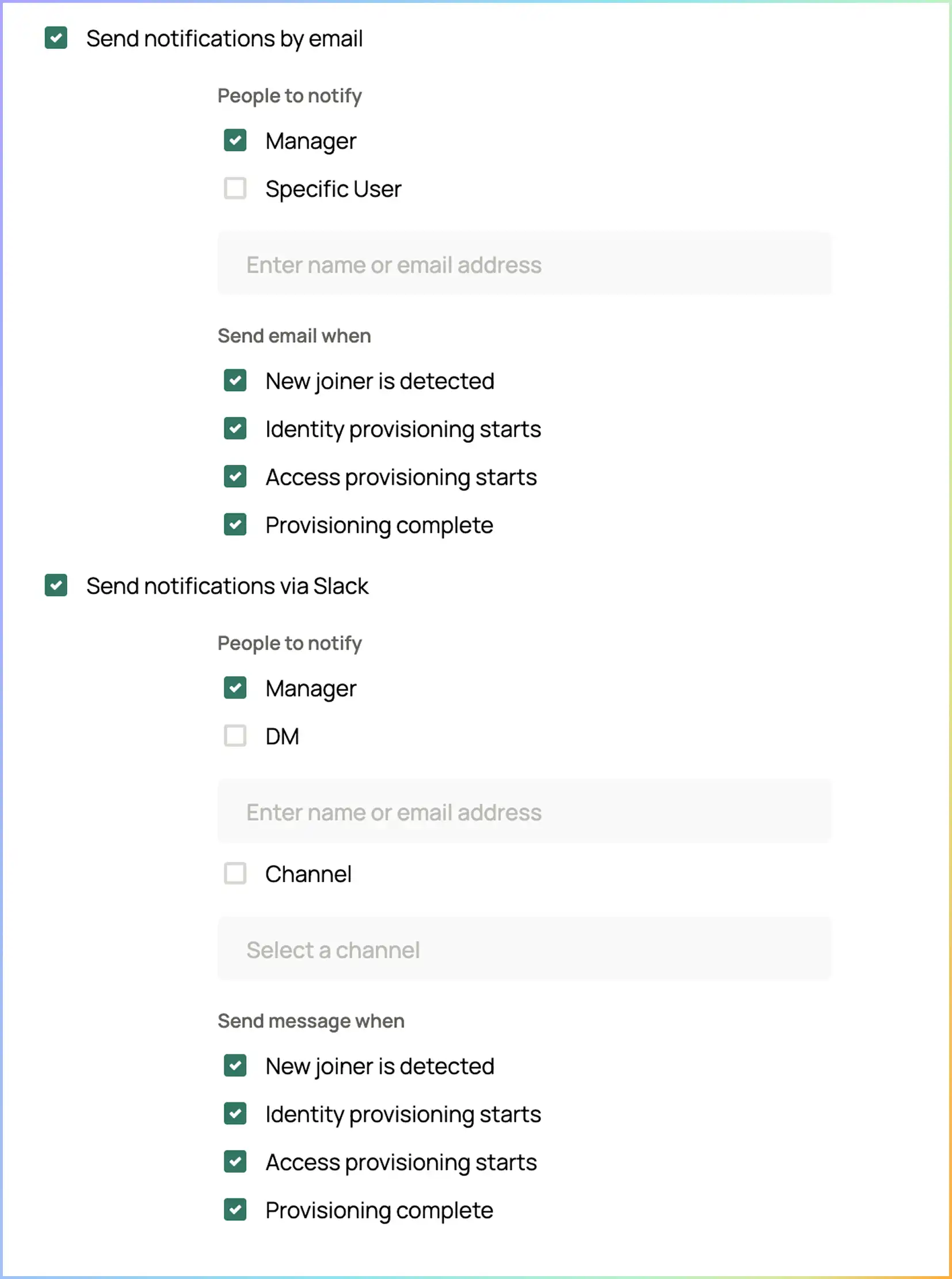
Different message at each phase. Manager learns about the new hire at detection; the IT contact learns about the bundle at provisioning; joiner gets a "you're set up" note at completion.
Configurable per organization. Manager at detection, configurable IT contact (specific user or Slack/Teams channel) at provisioning, joiner at completion. Role-based IT group routing is on the roadmap.
All four out of the box. Org default with per-event override; per-recipient channel preference supported.
Sent — with delivery state where the channel supports it. The notification record is part of the audit pack.
Notifications routed per phase, per role — so every stakeholder gets the right context at the right time, not the same status email three times.
Status meetings on joiners Eliminated
Manager surprise on hire date Eliminated
IT manual notification work Eliminated
Joiner knows what they have access to Day one

When your identity provisioning workflow runs in a silo, managers waste time chasing IT while new hires spend their first mornings waiting for access permissions to clear. Bring absolute visibility to your workforce operations—book a demo to see how automated cross-app notifications eliminate status meetings and secure your day-one lifecycle loop.
Oleria's notifications are workflow-scoped — they fire from the joiner / leaver / mover workflow, not from generic alerts. They complement (do not replace) IT's existing notification infrastructure. Slack or Teams channels for joiner-related context become a single source of truth for "what got provisioned for whom."
Yes. Standard-language templates ship by default — sender, subject, body. Per-organization customization for tone, links, or organization-specific context (HR portal links, IT support contacts). Variables auto-fill from the HRIS record and the bundle.
A configurable user, Slack channel, or Teams channel today. The provisioning event routes to a specific recipient — typically a Slack or Teams channel like #joiner-provisioning, or a named IT lead. Role-based IT group routing (so any member of an "IT operations" team gets the notification) is on the roadmap.
New-hire detected from HRIS, provisioning started, identity created, bundle granted, accounts enabled, provisioning complete. Each event has a configurable recipient. Manager and the IT contact get the operational events; joiner gets the completion event with what they have access to.
Email, Slack, Microsoft Teams, and in-app — all out of the box. Each channel is independent; an event can fire one or any combination. Per-organization configuration with per-event overrides; per-recipient channel preference supported. Channel selection is captured in the audit trail.