Quick Summary: A leaver workflow dry run in Oleria Trustfusion, an AI-native identity security platform, lets IAM teams preview every revocation — apps, groups, and NHIs — before committing, so misconfigured offboarding is caught before access is removed.
Dry run leaver workflows to preview revocations before committing.
Run any leaver workflow in dry-run mode and see exactly what access would be removed — every app, every group, every NHI — without removing any of it. Build confidence with security and compliance teams; catch over-broad revocations before they happen; test new workflow configurations safely.
Leaver workflows are the highest-stakes part of identity governance — and the most feared. A misconfigured leaver workflow that auto-revokes the wrong access can break a team, a deployment pipeline, a regulated process. So security and compliance teams under-trust automation; offboarding stays manual; the audit gap on leavers persists.
The fear is reasonable. Most IGA tools require admins to commit revocations before they can see the consequences. There's no preview, no dry-run, no "what would happen if" mode. Either you commit and hope, or you don't run the workflow at all.
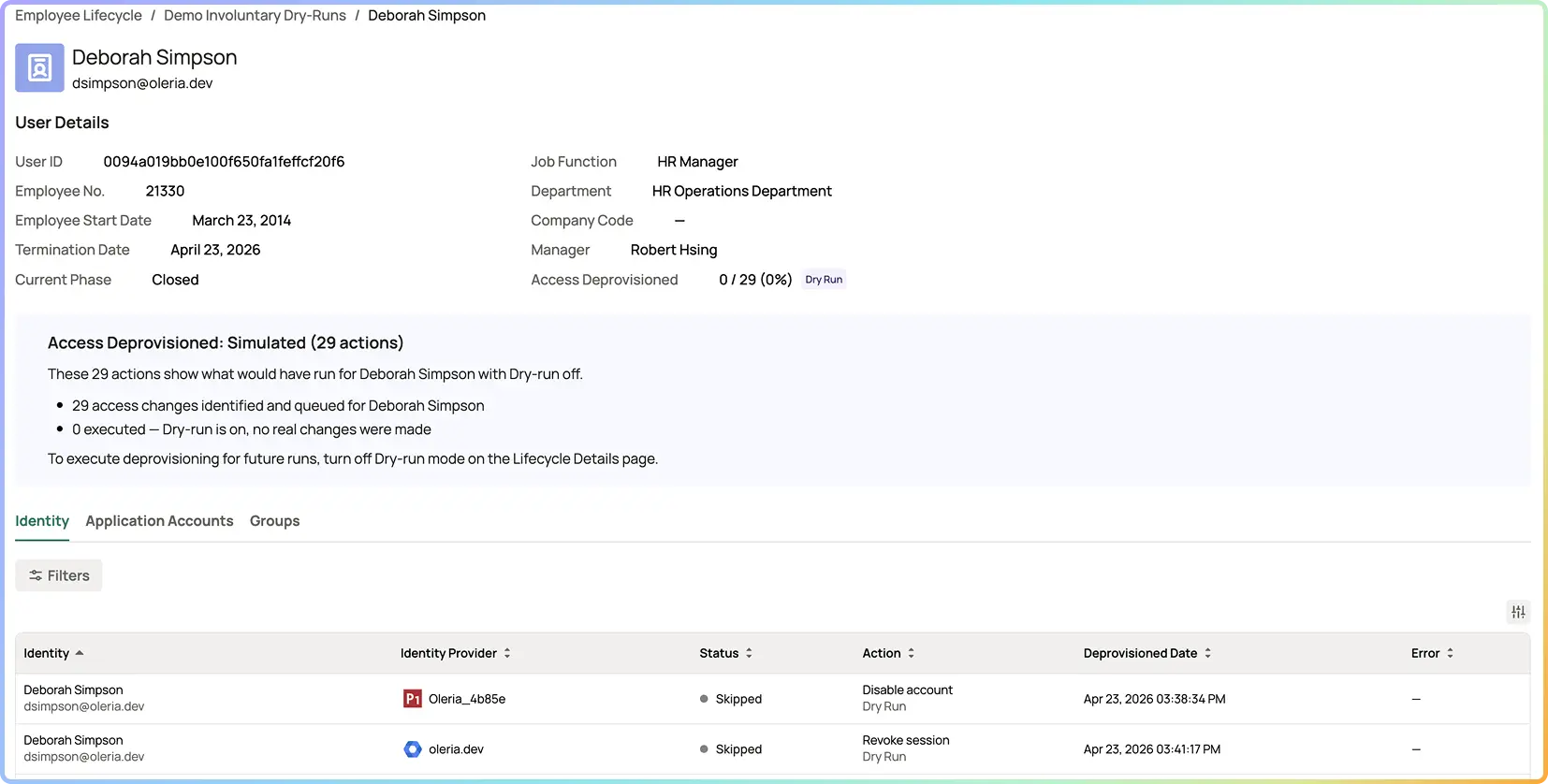
Per-employee execution mode. Mark an employee (or set of employees) as dry-run; the workflow runs end-to-end but actions are marked Status Skipped instead of executing. Previews what would happen, doesn't change anything.
Every app the employee touches, every group membership, every owned NHI flagged for re-attribution — surfaced before any action runs. Admin sees the complete blast radius before committing.
Per D-40's remediation engine: dry-run shows which non-write integrations would generate ServiceNow / Jira tickets, with the planned ticket contents. The IT operator queue stays clean; the admin sees what would land in it.
Dry-run runs are captured in audit distinctly from production runs — every preview is recorded with admin identity, workflow target, timestamp, and the planned action set. The audit trail proves the preview happened, even when no access was changed.
Dry-run is deterministic, not AI-driven. The intelligence is upstream — in the access graph that knows the employee's full surface and the remediation engine that knows which connectors support which actions. Dry-run surfaces all of that without committing. Confidence becomes a configurable property, not a leap of faith.
Confidence in leaver automation Built (preview-before-commit)
Misconfigured leaver workflows caught Before access is removed
Time spent investigating "did we just break something" Eliminated
Adoption of leaver automation Higher (less feared)

The underlying ExecutionMode primitive is shared across ILM workflows (joiner, mover, leaver), so dry-run is technically available for any ILM flow. This outcome page focuses on the leaver use case where the trust-and-blast-radius story is sharpest. Joiner and mover dry-runs are useful for testing workflow configurations but the customer-value framing is leaver-first.
Re-run in default mode. The dry-run is intentionally a separate action from commit — the preview is the artifact you review and approve; commit is the explicit second step. This keeps "I previewed it" and "I committed it" as two distinguishable audit events, which matters for high-stakes offboarding.
The same fidelity as a production run, with every action marked StatusSkipped instead of Success/Failed. Admin identity, workflow target, action set, ITSM ticket plan — all captured. The audit shows the preview happened, by whom, against which target, with what plan. Auditors see dry-run runs distinct from committed runs.
ExecutionMode is per-employee within any leaver workflow. HRIS-triggered workflows can run with selected employees in dry-run while others run in default mode (useful during rollouts). Manually-designated leavers (D-41) can also be marked dry-run if the admin wants to preview the surface before firing the actual revocation. The same ExecutionMode primitive applies.
Three cases. First: building trust with security and compliance teams who fear automation. Second: testing a new leaver workflow configuration before rolling it out broadly. Third: previewing the blast radius for a high-profile or sensitive departure (executives, contractors with regulated-data access, security-incident-driven offboarding) before committing the revocation.
The full revocation surface for the target employee — every connected app the user touches, every group membership, every NHI flagged for re-attribution — plus every ITSM ticket that would have fired for non-write integrations (per D-40). The workflow runs end to end; actions are marked StatusSkipped instead of executing. Admin sees exactly what would have happened, with no changes to access state.