Quick summary: Roles are the primary mechanism through which corporate access is granted—and the primary layer where dangerous over-permissioning accumulates over time. Relying on isolated SaaS administrative consoles makes it impossible to detect multi-app role stacking or hidden separation-of-duties (SoD) violations. Centralizing role definitions into a live access graph allows identity security teams to systematically right-size permissions, remove dormant role holders, and enforce true least privilege at scale.
Security, IT, and compliance teams gain a continuously maintained, cross-application view of every role and permission in the environment — what each role enables, who holds it, how many people hold it, how it was assigned, and whether it is being actively used. Role and permission insights surface over-permissioned role definitions, bloated memberships, unused permissions, and toxic combinations — enabling teams to right-size access entitlements, reduce the standing attack surface, and build a defensible least-privilege posture across every connected application.
Why role and permission hygiene matters: Roles are the primary mechanism through which access is granted at scale — and the primary mechanism through which over-permission accumulates. A role defined too broadly grants every member more access than they need. A role with too many members includes people who should never have had it. An unused permission within a role is standing exposure with no business justification. Cleaning up roles and permissions at the definition level is the highest-leverage identity hygiene investment available — it fixes access for everyone assigned to that role, not just one account at a time.
Role and permission governance requires visibility at two levels simultaneously: the role definition (what it enables) and the role assignment (who holds it and whether they need it). Without a unified platform, both levels are opaque:
· Role definitions are opaque without deep application knowledge. What a role actually enables — which objects it can access, which actions it can take, which data it can read or modify — is documented inconsistently across applications. Some applications provide detailed permission breakdowns via API; others surface only a role label. Without normalized visibility into role definitions, teams cannot evaluate whether a role is appropriately scoped or whether it has accumulated permissions beyond its original intent.
· No cross-application role comparison. The same functional role — "Sales Manager," "Developer," "Finance Analyst" — may be implemented differently across Salesforce, GitHub, Snowflake, and Microsoft 365, with different permission sets and different membership populations. Without a cross-application view, inconsistencies in how the same business function is permissioned across systems are invisible.
· Role membership grows without a corresponding review trigger. New members are added to roles as people join teams, take on projects, or receive emergency access. Members are almost never removed with the same urgency. Role membership grows continuously, and the percentage of members who actively use the role's permissions — vs. those who hold it passively — is never measured.
· Unused permissions within roles are never surfaced. A role may contain 40 permissions of which 35 are actively used across its membership and 5 have never been exercised by anyone. Those 5 unused permissions represent standing exposure that has no active business value — but without activity-level permission data, they are indistinguishable from the permissions that justify the role's existence.
· Toxic combinations span application boundaries. A separation-of-duties violation may not be visible within a single application — but it exists at the identity level, where a user holds a role in one system that, combined with a role in another system, creates a prohibited combination. Without a cross-application access model, these toxic combinations are invisible until an auditor finds them.
· Role definitions drift without governance. Roles in SaaS applications are modified over time — permissions added for a specific project, scope expanded for convenience, new features rolled into an existing role. Without a mechanism to track role definition changes over time, teams cannot tell whether a role today matches what it was when its membership was last reviewed.
Oleria Trustfusion ingests role definitions, permission sets, and assignment data from every connected application and models them in the composite Access Graph — enabling role and permission insights at the definition level, the assignment level, and the usage level, across the full application estate.
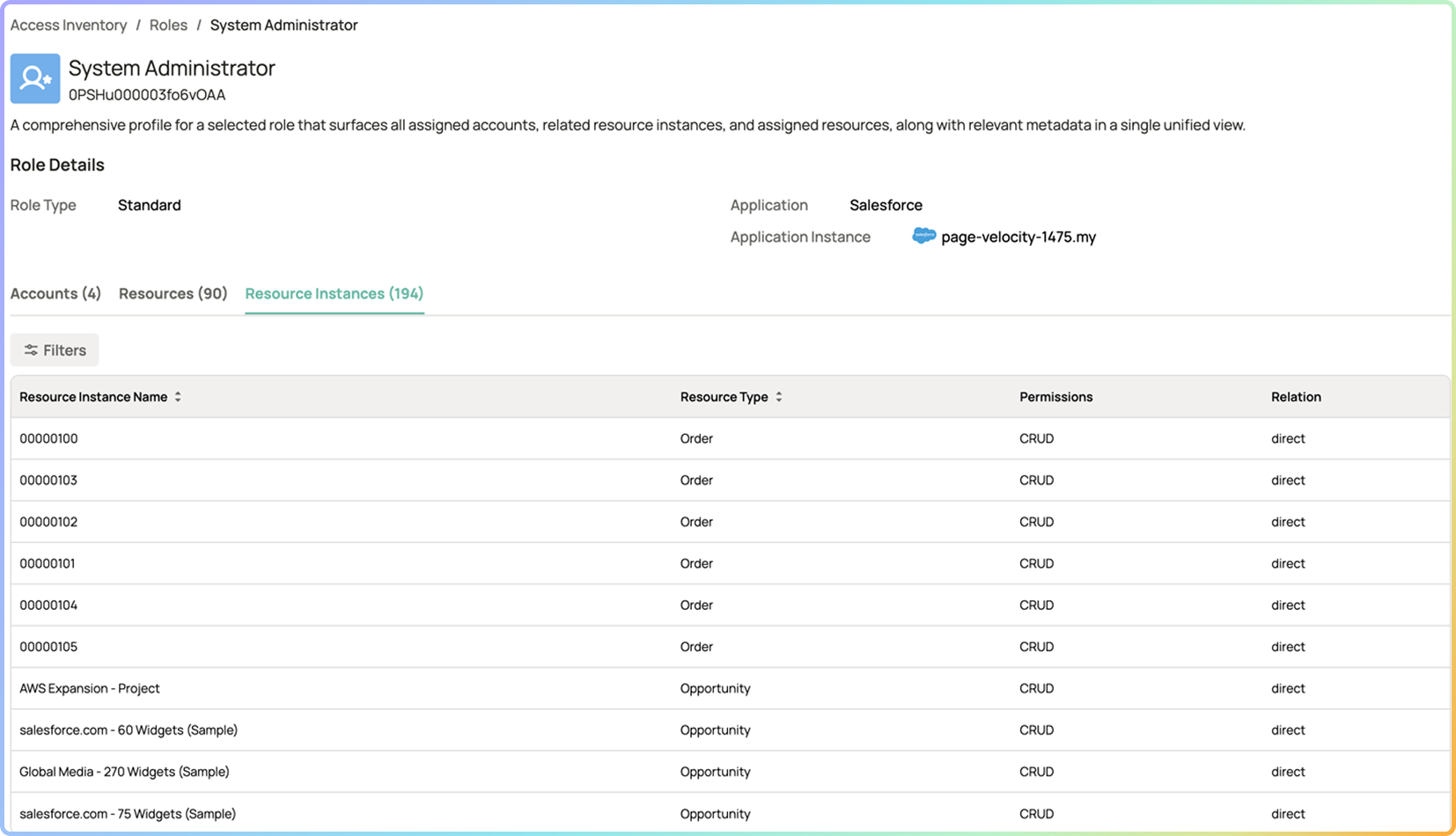
· Role inventory across all connected applications. Every role, permission set, and group in every connected application is ingested, normalized, and catalogued in the Access Graph. Security and IT teams can browse the complete role inventory across all applications from a single view — without logging into each admin console separately.
· Permission-level visibility within roles. Where application APIs expose permission-level detail, Oleria surfaces the specific capabilities each role enables — which objects, actions, and data types are in scope. Roles with unusually broad permission scope relative to their membership or stated purpose are flagged as over-permissioned role definitions.
· Role definition change tracking. Changes to role definitions — permissions added, permissions removed, scope modified — are tracked in the Access Graph with timestamps. Teams can see when a role's definition changed and what was modified, enabling governance of role drift over time.
· Unused permission detection within roles. Where activity data is available at the permission level, Oleria identifies permissions within a role that have not been exercised by any member of that role within the configured activity window. Unused permissions represent standing exposure with no demonstrated business value — candidates for removal from the role definition.
· Full membership population per role. Every identity assigned to every role is visible in the Access Inventory, with assignment date where available, identity type (employee, contractor, guest), employment status, and last activity in the application. Role membership lists are always current — not assembled from a quarterly export.
· Over-membership detection. Roles with membership populations significantly larger than the business function they serve are surfaced as over-membership findings. A role originally designed for five finance administrators that has accumulated 40 members across departments is a governance gap that a per-application admin view will not proactively surface.
· Dormant role holders. Members assigned to a role who have not exercised the role's permissions within the configured activity window are identified as dormant role holders. They hold standing access through the role but have no demonstrated current need for it — candidates for removal from the role assignment.
· Separation-of-duties conflict detection. Where SoD policy rules are configured, Oleria evaluates role assignments across applications to detect toxic combinations — identities that hold roles in different systems that together violate a separation-of-duties requirement. Cross-application SoD visibility is a capability that per-application access reviews cannot provide.
· Role assignment without business justification. Role assignments that cannot be correlated to an HR role, a team membership, or a documented business justification — particularly in high-privilege roles — are flagged as unsubstantiated assignment findings for review.
· Normalized role comparison across applications. Roles that serve the same business function across different applications can be compared for permission scope consistency. A "Developer" role in GitHub that grants significantly broader access than the "Developer" role in Snowflake for the same business unit is surfaced as a scope inconsistency for review.
· Privilege accumulation through role stacking. An identity that holds multiple roles in the same application — or roles across multiple applications — may accumulate effective permissions beyond what any single role would grant. The Access Graph resolves the combined effective permission set and surfaces identities where role stacking produces an over-privileged access footprint.
· Role-centric access review. Access certifications can be initiated at the role level — reviewing who holds a specific role across all connected applications, rather than reviewing one application at a time. This role-centric review model is more efficient for high-risk roles and more aligned with how access governance decisions are actually made.
Stage 1 — Continuous Ingestion of Role Definitions, Entitlements, and Multi-App Activity: Oleria connectors pull role and permission set definitions, role membership lists, and — where available — permission-level activity data from every connected application. This includes IDP groups and role assignments (Okta, Entra ID), SaaS application roles (Salesforce profiles and permission sets, GitHub repository and organization roles, Snowflake roles, Microsoft 365 admin roles, Google Workspace admin roles, and others), and cloud IAM policy assignments (AWS IAM roles and policies, Azure RBAC roles, GCP IAM bindings). All data is ingested continuously via read-only API connections.
Stage 2 — Structural Modeling of Application Roles Within the Access Graph: Role and permission set data is normalized to a common schema and loaded into the Access Graph as typed nodes — with edges representing membership assignments, permission grants, and inheritance relationships. Each role node is enriched with: membership count, permission scope classification (standard, elevated, privileged), definition change history, and where available, per-permission usage data. Role nodes are linked to the identity nodes of every member, enabling both role-centric and identity-centric queries against the same data model.
Stage 3 — Continuous Evaluation of Identity Posture and Separation-of-Duties (SoD) Policies: Trustfusion evaluates role definitions and assignments against configurable governance polic- maximum membership thresholds for privileged roles, dormant member thresholds, unused permission flags, SoD policy rules across applications, and over-permission scope heuristics. Each violation generates a typed posture finding with the role context, the specific policy gap, affected members, and recommended remediation. Role definition changes that expand scope beyond the configured threshold trigger immediate review findings.
Stage 4 — Role-Centric Insight Visualization and Automated Campaign Remediation: Role and permission insights surface in the Access Inventory and Posture Dashboard with filtering by application, role type, membership size, privilege tier, and finding type. Role owners and application admins can browse the full role profile — definition, membership, usage, and findings — from a single view. Posture Campaigns drive membership cleanup, permission right-sizing, and SoD violation remediation. Role-centric access certifications are initiated directly from the role inventory with current membership data pre-populated.
A mature role and permission governance program produces a leaner, better-defined access model that directly reduces the standing attack surface and the compliance burden associated with over-permissioned access:
· Every role has a documented purpose and owner. Every role in every connected application has a named owner accountable for its definition and membership. Roles without documented owners are flagged immediately and assigned or decommissioned within a defined SLA.
· Role membership is proportionate to purpose. Highly privileged roles have small, tightly controlled membership populations. Membership count is tracked per role and reviewed when it grows beyond the configured threshold. Dormant role holders — members who have not exercised the role's permissions — are removed on a defined cadence.
· Unused permissions identified and removed from role definitions. Permissions within roles that have not been exercised by any member within the configured activity window are surfaced for removal. Over time, role definitions become leaner and better aligned with actual usage — reducing the blast radius of any future compromise involving that role.
· No cross-application SoD violations. Every configured SoD policy rule is evaluated continuously across all connected applications. Open SoD conflict findings are tracked, owned, and remediated within defined SLAs. The SoD violation count is a reported compliance metric trending to zero.
· Role-centric access reviews faster and higher-confidence. Periodic access reviews of high-risk roles are initiated from the role inventory with current, complete membership data. Reviewers certify against live data — not a quarterly export — and obvious anomalies (dormant members, unsubstantiated assignments) have already been addressed continuously. Review time is reduced significantly.
· "What does this role enable and who holds it?" answered in seconds. For any role in any connected application, the full profile — permission scope, current membership, usage data, recent definition changes, and open findings — is available from the Access Inventory immediately, without requesting a report from the application owner.

Yes. Trustfusion distinguishes between several access construct types in the Access Graph. Roles are application-defined access bundles that grant a specific set of permissions — Salesforce profiles, Snowflake roles, GitHub repository roles, AWS IAM roles. Groups are identity-level collections — Entra ID security groups, Okta groups, Google Groups — that may confer access through role or resource assignments. Permission sets are granular, application-specific permission configurations that may be assigned independently or composed into roles. All three construct types are modeled in the Access Graph as typed nodes with their own insight profiles, and the relationships between them are represented as typed edges — so the full access derivation chain is traceable.
Where connectors expose per-permission activity, unused permissions across the membership population are flagged.
SoD policy rules are configured in Trustfusion as pairs or groups of roles or permissions that must not be held by the same identity simultaneously — for example, "create purchase order" and "approve purchase order," or "deploy to production" and "approve production deployments." Oleria evaluates each identity's role assignments across all connected applications against these rules, identifying combinations that violate policy regardless of which applications the conflicting roles live in. The finding identifies the specific identity, the conflicting roles, the applications they belong to, and the policy rule violated.
Yes. For roles where unused permission data is available, Oleria surfaces the specific permissions that have not been exercised by any member within the activity window — giving role owners a data-driven basis for removing permissions from the definition. For roles where the full membership population includes dormant holders or members without a current business justification, Oleria surfaces the removal candidates with their last-activity data and assignment context. The role owner can action these through a Posture Campaign without needing to manually review each member individually.
Roles and permissions are first-class objects in the Trustfusion Access Graph — not a secondary reporting layer. Every role is a typed node. Every membership assignment is a typed edge. Every permission grant within a role is modeled as a relationship with provenance. This means that role-centric queries ("who holds this role?") and identity-centric queries ("what roles does this identity hold, and what do they enable?") are both answered from the same live data model — with full path resolution including indirect access through nested groups and role hierarchies.
Yes. Oleria's cloud IAM connectors ingest role definitions and policy bindings from AWS IAM (roles, policies, and inline policy attachments), Azure RBAC (built-in and custom role definitions and assignments), and GCP IAM (roles and IAM policy bindings at project, folder, and organization level). Cloud IAM roles are modeled in the Access Graph alongside SaaS application roles, enabling a unified view of role and permission posture across cloud infrastructure and SaaS applications.
SOX ITGC requires evidence that access to financially significant systems is restricted to need-to-know and reviewed regularly — role membership reviews and SoD conflict evidence are core deliverables. SOC 2 Type II (CC6.1 and CC6.3) requires that access be provisioned based on least privilege and reviewed for appropriateness. ISO/IEC 27001 (A.9.2) requires that access rights be allocated on a need-to-use basis and reviewed at regular intervals. PCI DSS v4.0 (Requirement 7) requires that access to system components be limited to only that access required to perform the individual's job responsibilities. NIST SP 800-53 (AC-6 Least Privilege and AC-2 Account Management) mandates that privileges be restricted to the minimum necessary. Trustfusion's role and permission inventory, posture findings, and remediation records provide the evidence these frameworks require.