Quick Summary: Oleria Trustfusion delivers comprehensive identity entitlement visibility by unifying fragmented access data into a centralized, live model. As an AI-native identity security platform, Oleria automatically correlates human and non-human identities across every IDP, SaaS application, and cloud environment—transforming complex access relationships into clear, queryable insights in seconds.
Security, IT, and compliance teams gain a single, continuously maintained view of every identity — human and non-human — and every entitlement that identity holds across every connected application and system. "Who has access to what?", "How they got access?", "What are they doing with that access?" becomes a question that can be answered in seconds, not days, for any identity, any application, or any combination of both.
The core value: The Access Graph is not a report or a snapshot. It is a living model of your access environment — always current, always queryable, always the authoritative source for every investigation, review, or policy decision that depends on knowing the true state of access.
Every enterprise already has tools that hold access data — IDPs, SaaS admin consoles, cloud IAM dashboards, HR systems, ticketing platforms. The problem is that none of them speak to each other, and none of them holds the complete picture. Organizations trying to answer "who has access to what" without a unified graph face:
· Fragmented access data with no common identity. The same person exists as a different record in Okta, Salesforce, GitHub, and Workday. Without a correlation layer that resolves these into a single identity, there is no way to produce a complete entitlement view for any individual.
· Application-specific visibility only. Each SaaS admin console shows access within that application. No native tool shows access across applications simultaneously. Answering "what can this person do across our entire environment?" requires logging into a dozen consoles and stitching results together manually.
· Non-human identities are invisible. Service accounts, OAuth application grants, API keys, managed identities, and shared accounts rarely appear in human-centric access tools. They accumulate entitlements silently, often with no owner, no expiration, and no review.
· Access data goes stale immediately. Any manually assembled access inventory starts aging the moment it is completed. Provisioning and deprovisioning events happen continuously; without live ingestion, even a well-built spreadsheet is unreliable within days.
· No graph means no relationship visibility. Access risk is often not about any single entitlement in isolation, but about combinations — a user who holds admin rights in two systems, a service account that has write access to a production database and read access to a secrets vault. Flat lists cannot surface these relationships; a graph can.
· Audit and investigation take too long. When an incident occurs or an auditor asks who had access to a sensitive resource on a specific date, the answer requires pulling logs from multiple systems, correlating them manually, and hoping the data is complete. With no unified graph, this routinely takes days or weeks.
Oleria Trustfusion builds and continuously maintains a composite Access Graph — a unified model of every identity, every entitlement, and every relationship between them across every connected system. It is the foundation on which every other Oleria capability rests, and the single source of truth for access visibility across the organization.
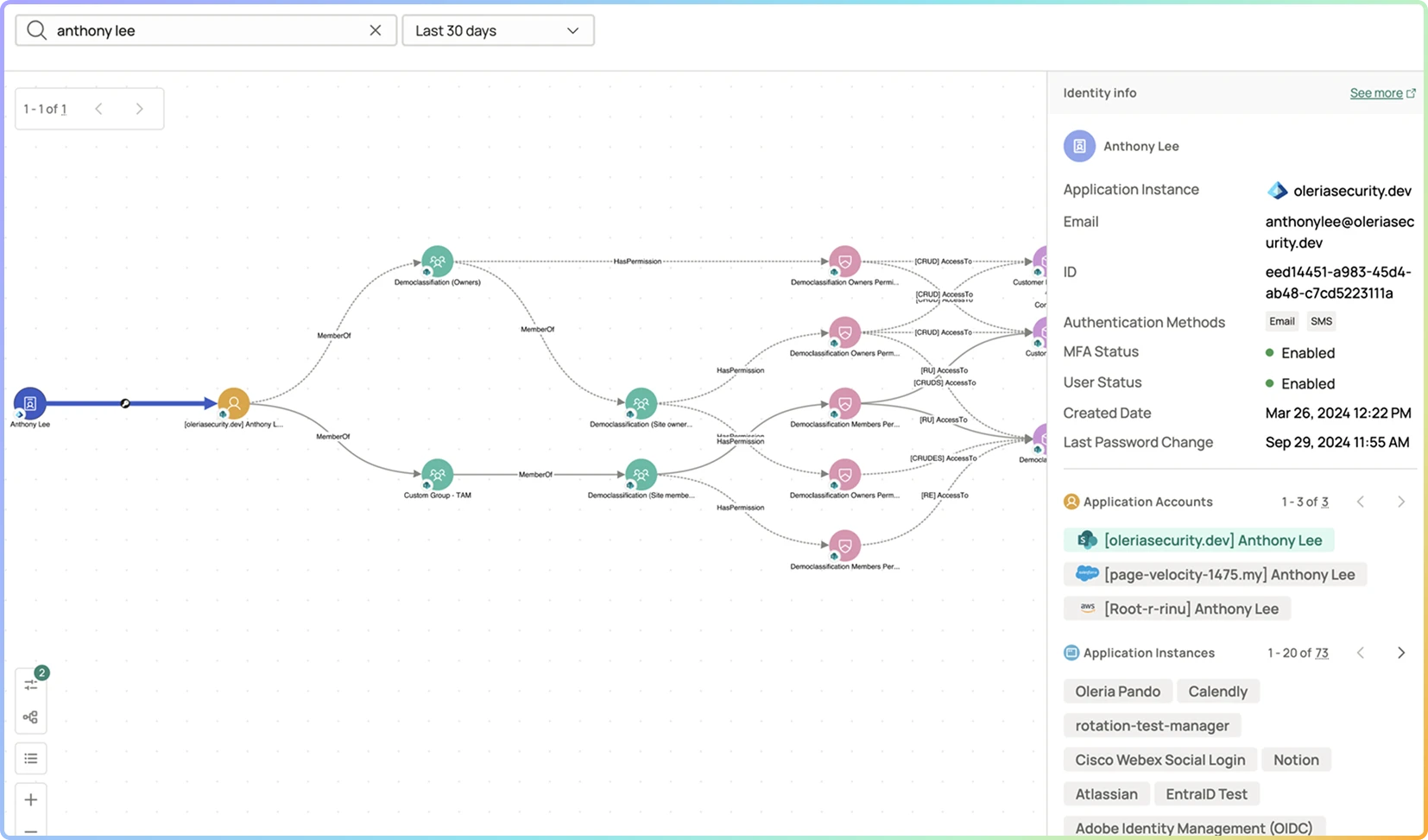
Every identity (human and non-human), application, resource, role, group, and permission is a node. Every relationship between them — who holds what, granted by whom, via which mechanism — is an edge. The graph is continuously updated as connectors ingest new data, so it reflects the current state of access at all times.
Oleria resolves the same person's records across Okta, Entra ID, Salesforce, GitHub, Workday, and other systems into a single correlated identity. There is no ambiguity about whether "jsmith" in GitHub and "john.smith@company.com" in Salesforce are the same person.
Every identity has a dedicated profile that shows, in one place: all application accounts, all entitlements across every connected app, group and role memberships, license assignments, dormancy status, recent access changes, and open posture findings. Any question about what a specific person or system can do is answerable from this view.
Service accounts, OAuth grants, API keys, shared accounts, and managed identities are modeled in the graph with the same fidelity as human identities. Their entitlements, owners, usage patterns, and risk posture are visible alongside human access — not in a separate tool or ignored entirely.
The graph is queryable from both directions. Security teams can ask "who has admin access to Snowflake?" just as easily as "what can this identity do in Salesforce?" — enabling both identity-centric and resource-centric investigation without writing custom queries.
A structured, always-current inventory of every access relationship in the environment — browsable, filterable, and exportable for audits, risk assessments, and compliance evidence. It replaces the spreadsheet-based access matrices that most organizations maintain manually.
Stage 1 — Connecting API-Driven Sources Across Identity and Cloud IAM: Oleria connectors integrate with IDPs (Okta, Microsoft Entra ID), SaaS applications (Salesforce, GitHub, Snowflake, Microsoft 365, Google Workspace, ServiceNow, and others), cloud IAM (AWS IAM, Azure RBAC, GCP IAM), HR systems (Workday, BambooHR), and on-premises directories. Connectors are read-only and operate via standard APIs — no agents, no intrusive integrations.
Stage 2 — Ingesting, Normalizing, and Correlating Canonical Identities: Raw entitlement data from each source is normalized into a common schema. Identity records from different systems are correlated and resolved into canonical identity objects — human or non-human — with all source-system accounts linked. Groups, roles, permission sets, and resource grants are all modeled as typed graph nodes with relationship edges.
Stage 3 — Building and Enriching the Composite Access Graph: The Access Graph is assembled from normalized data and enriched with context: HR employment status, manager hierarchy, department, location, last-activity timestamps per application, license assignments, and risk signals. The graph reflects not just what access exists but who is responsible for it and whether it is being used.
Stage 4 — Surfacing Fine-Grained Visibility and Point-in-Time Queries: The graph powers the Identity 360 View, the Access Inventory, and the Posture Dashboard. Security and IT teams browse, filter, and query the graph through the Trustfusion UI. Every change to the graph — a new grant, a revoked entitlement, a role modification — is timestamped and retained, enabling point-in-time queries and historical investigation.
A mature Access Graph implementation produces visibility outcomes that directly accelerate security operations, compliance, and risk management:
· Any identity answerable in under a minute. "What does this person have access to across all of our applications?" is answered in the Identity 360 View in seconds — with no manual lookup, no cross-referencing of spreadsheets, and no dependency on a specific team or admin.
· Any resource answerable in under a minute. "Who has admin access to this Snowflake instance?" or "which identities can write to this S3 bucket?" is answered directly from the Access Graph — identity-centric and resource-centric queries are equally first-class.
· NHIs fully visible and owned. Every non-human identity in the environment is in the graph, has a documented human steward, and its entitlement scope is known and bounded. There are no "unknown" service accounts or unowned OAuth grants.
· Access Inventory replaces manual matrices. The organization's access inventory is maintained by Trustfusion in real time. Manual spreadsheet-based access matrices are retired. Audit evidence is pulled from Trustfusion on demand, not assembled from exports and emails.
· Incident response time cut significantly. When an incident occurs, the graph answers "who had access to X at time T?" immediately — reducing investigation time from days to minutes and enabling accurate blast-radius assessment without log archaeology.
· Compliance questionnaires answered from a single source. SOX, ISO 27001, SOC 2, and regulatory access questionnaires are answered directly from the Access Graph and Access Inventory, with point-in-time snapshots available as audit-ready evidence.

A graph models entities (identities, applications, roles, resources) as nodes and the relationships between them (who has what permission, granted via which role, in which application) as edges. This structure matters because access risk is relational — a flat list of permissions cannot show that two entitlements in different systems combine to create a separation-of-duties violation, or that a service account with write access to a database also has read access to a secrets vault. The graph makes those relationships visible and queryable.
Oleria's identity correlation engine resolves the same individual's records across source systems using a combination of email address, employee ID, display name, and configurable matching rules. The result is a single canonical identity object in the Access Graph with all source-system accounts linked to it. Administrators can review and override correlations where automatic matching is ambiguous.
Both. The Access Graph reflects the current state of access at all times, and every change to the graph is timestamped and retained. Security and compliance teams can query the graph as of a specific date — answering questions like "who had access to this resource on the date of the incident?" — without requiring raw log reconstruction.
NHIs — service accounts, OAuth application grants, API keys, shared accounts, managed identities, and automation pipeline identities — are modeled as first-class identity nodes in the graph, with their own entitlement edges, usage data, assigned human stewards, and risk posture. They appear in the Access Inventory and Identity 360 View alongside human identities, and they are subject to the same posture evaluation rules.
Oleria supports connectors for major IDPs (Okta, Microsoft Entra ID), SaaS applications (Salesforce, GitHub, Snowflake, Microsoft 365, Google Workspace, ServiceNow, and others), cloud IAM (AWS IAM, Azure RBAC, GCP IAM), and HR systems (Workday, BambooHR). The connector library continues to expand. For applications not yet covered by a native connector, Oleria provides options for custom integration via API.
Oleria connectors poll source systems on a regular cadence and process webhook or event-based notifications where available. Changes to entitlements — new grants, revocations, role changes, group membership updates — are reflected in the Access Graph typically within hours of occurring. The graph is never a static export; it is a continuously maintained live model.
The Access Graph is the foundation that every other capability depends on. Posture Campaigns evaluate entitlements against policy using the graph as the source of truth. Drift detection compares the current graph state against an expected baseline. The Identity 360 View is a rendered query of the graph for a specific identity. The Access Inventory is a structured export of graph data. Nothing in Trustfusion works without the graph — it is the platform's core data model.