Quick Summary: Oleria Trustfusion, an AI-native identity security platform, delivers Automated Access Review Remediation that executes revocations at campaign close—directly revoking access for connected apps and opening ITSM tickets for non-write integrations, so every reviewer decision reaches a documented, auditable outcome.
Remediate access review decisions automatically, revoking at campaign close with ITSM ticket fallback.
When the reviewer rejects access — or doesn't respond — Oleria revokes automatically at campaign end. For applications without write integration, an ITSM ticket fires with the exact actions to take. The control runs to ground; the audit captures every step.
Most IGA tools end the review and stop. Revocation becomes a separate ticket; an admin manually runs each one; per-app integration coverage is uneven; failures slip; the audit gap shows up at the next cycle. The reviewer approved the revocation; the access is still there.
Without a remediation engine that runs at campaign close, the review is theatrical: it produces a list of rejections that nobody acts on. The control fails silently — and the auditor catches it. Automated Access Review Remediation is the missing link between a reviewer's decision and the access actually being removed.
Toggle remediation per trigger: revoke on reviewer rejection (default on, recommended) and revoke on no response (default off, opt-in for tighter control). Independent toggles; per-organization defaults.
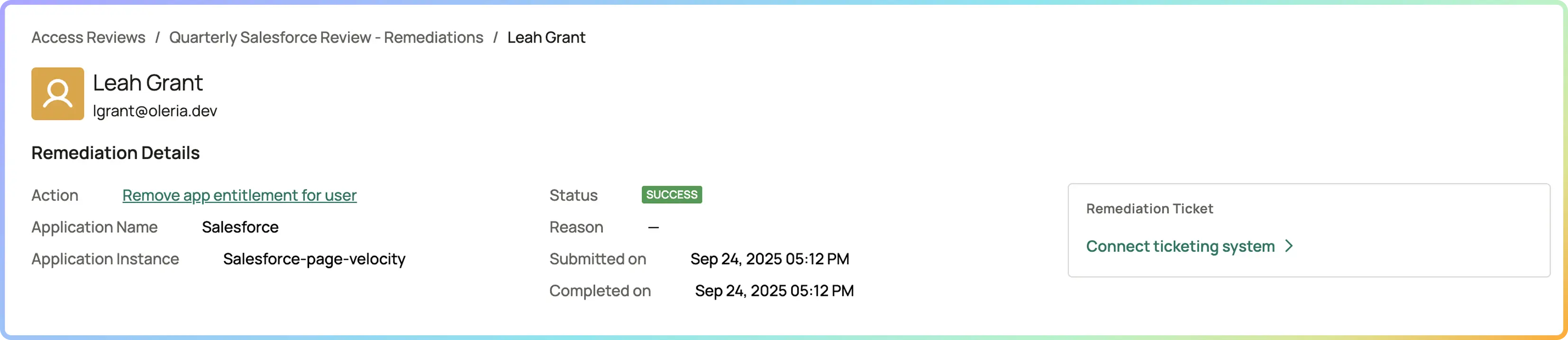
Remove user from group, remove user from application, remove user from role, remove group from application. Covers the common revocation operations across SaaS, cloud, and IdP.
When the integration doesn't support write — or doesn't support the specific action type Oleria needs — a ServiceNow or Jira ticket auto-creates with the access surface, target identity, and exact actions to take. The audit trail captures both automated and ticket-driven revocations.
Every remediation captured: Success, Failed, In Progress, Skipped, or Not Supported. Transient failures retry automatically; permanent failures surface to the IAM admin with the failure reason for follow-up.
Remediation is deterministic, not AI-driven. The intelligence sits upstream in the recommendation; once the reviewer's decision is captured, remediation runs the action — connector-aware, fault-tolerant, audit-complete.
Manual revocation tickets after reviews Eliminated for connected apps
Time-to-revocation Campaign close, not days later
Audit gap on "approved revocations not executed" Eliminated
Coverage on non-write integrations ITSM ticket every time, no manual follow-up

Oleria opens a ticket via your connected ITSM (ServiceNow or Jira) for non-write actions, populated with the revocation specifics. The ticket becomes the IT operator's queue item — IT closes the ticket after the action; Oleria's audit reflects both the ticket creation and the eventual closure. Bidirectional integration is supported where the ITSM connector allows.
Every remediation captured: which action type, on which target identity, against which application/group, with what result (Success / Failed / In Progress / Skipped / Not Supported), at what timestamp, by what workflow. Continuous capture; available in the audit pack today via CSV export and live MCP-based assembly.
Transient failures (network blips, connector backoff) retry automatically. Permanent failures — bad credentials, removed integration, or hard rejection from the connector — surface to the IAM admin with the failure reason. The remediation status reflects the actual outcome (Failed) rather than silently completing; the audit reflects both the attempted action and the failure.
Yes. Two independent toggles — "Reviewer rejected" (default on, recommended) and "No response" (default off). Most organizations leave "Reviewer rejected" on; "No response" remediation is opt-in because it can over-revoke when reviewers miss the window for legitimate reasons. Per-campaign configuration with org defaults.
ITSM ticket fallback. Oleria creates a ServiceNow or Jira ticket with the access surface (which user, which app, which role/group), the exact actions for the IT operator, and a link back to the audit trail. The ticket becomes the operator's queue item; the audit captures both the auto-created ticket and the eventual closure.
Four: remove user from group, remove user from application, remove user from role, remove group from application. These cover the common revocation operations Oleria sees across SaaS, cloud, and IdP integrations. Per-action-type capability is checked against the connector before execution; unsupported actions fall through to the ITSM ticket path.