Summary: Active Directory groups control access to file shares, on-premises applications, and much of the cloud through federation — yet AD group membership is one of the most-neglected identity controls in enterprise environments. Oleria Trustfusion, an AI-native identity security platform, brings Active Directory group membership certification into a structured, repeatable governance program — with group context pulled directly from AD, per-member peer and HR-change signals, and audit-grade evidence on every review cycle.
Certify Active Directory group membership — direct members, group context pulled from AD.
Active Directory Group Membership campaigns. Group description and owner pulled directly from AD at setup. Direct-member review with peer match and HR-change signals. Audit-grade certification on the directory that controls everything else.
Active Directory is still the directory of record at most enterprises. Its groups control access to file shares, on-prem applications, and (via federation) much of the cloud. Yet AD group membership is one of the most-neglected identity controls — AD's native review tooling is thin, and reviews tend to run as quarter-end exports rather than continuous controls.
The result: AD groups accumulate members across years and reorgs. Group descriptions go unmaintained, owners leave, and reviewers walk in with no context about what the group is for or who's accountable for it. Domain admin groups carry ex-employees that never got removed because the review never ran or rubber-stamped. Audits flag this routinely; remediation drags for months.
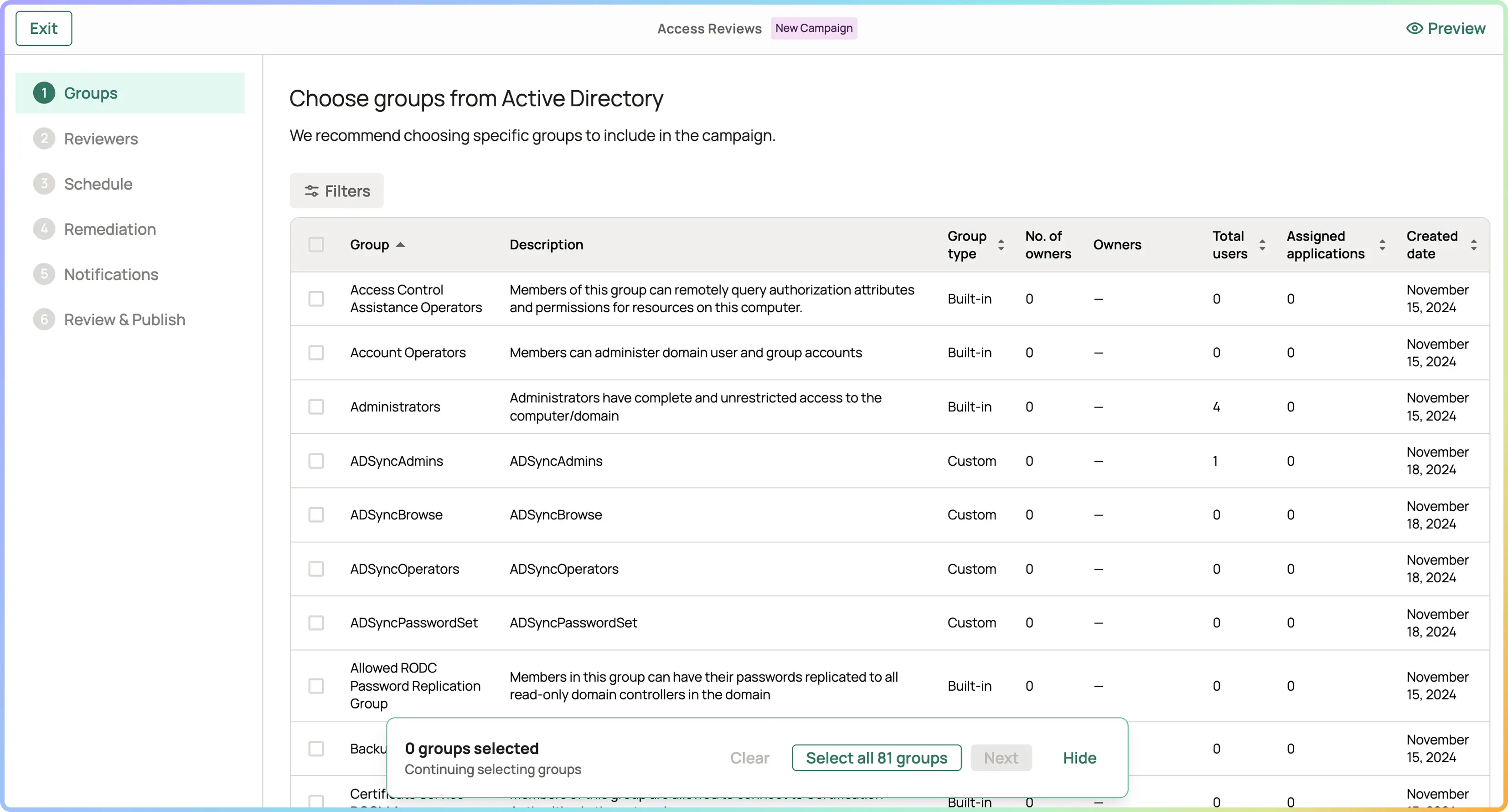
A campaign type purpose-built for AD. Direct members of the configured group are reviewed; revocations route through the AD connector.
Description and owner fields pulled directly from AD when the campaign is created. Reviewer sees what the group was created for and who's accountable for it — context that's typically lost in spreadsheet-driven reviews.
Peer match (other holders of the group with same role attribute) and HR change flag. AD does not expose dormancy at the access-review layer today; reviewers act on peer and HR signals plus the group context pulled at setup.
AD group reviews lean on group context pulled directly from AD (description, owner) plus per-member peer and HR-change signals. Recommended decisions per row; bulk-accept on the routine, examine the outliers.
Time to certify an AD group Days → minutes
Group purpose visible at review time From AD description + owner
Domain admin / privileged group reviews Faster cadence (monthly)
Audit findings on AD group membership Eliminated

Domain Admin groups, privileged operational groups, and legacy project groups in Active Directory carry access that's rarely reviewed — and the audit findings are routine. Oleria makes AD group membership certification consistent, evidence-driven, and audit-ready.
The member is removed from the AD group. Access tied to the group — file share permissions, federated app access, on-prem app authorization — is revoked downstream automatically (per D-40's remediation engine). Audit trail captures the AD action and the downstream effects. No separate cleanup tickets.
Yes. Most enterprises run hybrid environments — AD on-prem for legacy resources, Entra ID for cloud. Oleria treats them separately (AD groups via the AD campaign, Entra groups via the general Group Membership campaign). Entra reviews use the full three-signal engine (Dormant Days + Peer + HR) since Entra exposes login telemetry; AD reviews use peer + HR plus AD-specific group context. The access graph is unified; reviews scope to the directory of origin.
Risk-tiered. Domain Admins, Schema Admins, Enterprise Admins: monthly — these are the highest-leverage groups in any AD environment. Privileged operational groups: monthly. Standard distribution and resource groups: quarterly. Cadence is configurable per group; Oleria runs the reviews on schedule.
Today's AD Group Membership review covers direct members of the configured group. If user X is a member of group A, and group A is a member of group B, user X is reviewed via group A — not unrolled into a review of group B. Nested-group resolution in the review feature is a roadmap consideration. Oleria's underlying access graph supports nested groups for visibility; the review feature targets direct members today.
Peer match (other holders of the group with the same role attribute) and HR change (recent role / department / status change in HRIS). AD does not expose dormancy at the access-review layer today, so the dormant-days signal that powers other Oleria reviews isn't part of AD reviews. Group description and owner pulled from AD provide setup-time context that compensates for the absence of usage telemetry.
AD's structure is different from app-level groups — security vs. distribution groups, domain-specific scopes, federation paths to connected apps. The AD-specific campaign produces audit evidence formatted for AD compliance reviews, routes revocations through the AD connector, and pulls each group's description and owner directly from AD at campaign setup.