SharePoint sites created for projects, teams, and initiatives don't clean themselves up. They accumulate - each one a potential exposure point for sensitive documents, unreviewed permissions, and access that outlived its purpose.
Oleria surfaces every site with little to no recent activity, scores them by risk, and routes cleanup decisions to the right owners automatically - so your SharePoint environment stays current without a manual audit project every quarter.
The average Microsoft 365 tenant has hundreds of SharePoint sites. A significant portion were created for projects that finished, teams that reorganized, or initiatives that were abandoned. The sites still exist. The permissions - broadly shared at creation, never tightened afterward - still exist. The documents, some of them sensitive, are still accessible to everyone who had access on day one.
The problem isn't that IT doesn't care. It's that there's no systematic trigger to review a site once it goes quiet. Activity drops to zero, the site falls off everyone's radar, and it persists indefinitely. In a security review or data audit, stale SharePoint sites with broad permissions and sensitive content show up as findings that require manual remediation - often across dozens of sites at once.
Systematic detection and cleanup changes the operating model. Inactivity becomes a trigger, not an oversight. Sites are reviewed before they become audit findings.
Oleria gives you a complete inventory of stale SharePoint sites across your M365 tenant, scored by actual risk, with automated workflows that route each one to the right owner for disposition - without IT having to track down every site manually.
Stale site inventory. Every SharePoint site with no meaningful activity within your configured threshold - filterable by inactivity duration, permission breadth, and site owner.
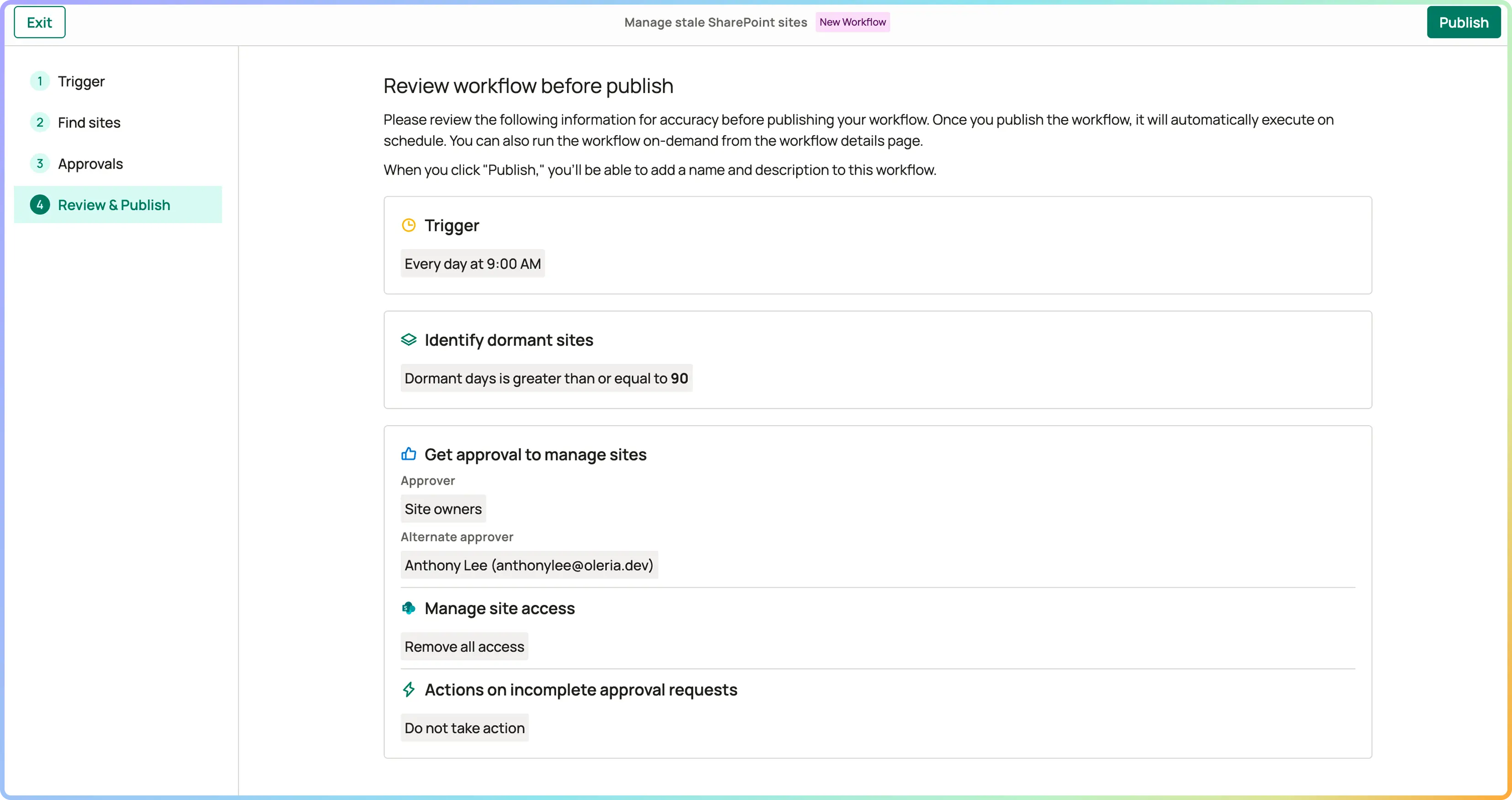
Owner-routed cleanup workflow. Site owners are notified automatically when a site crosses the inactivity threshold. They confirm: archive, retain with justification, or delete. No response within the grace period triggers escalation to their manager or a default IT action.
Full audit trail. Every decision - archive, retain, delete, escalate - is logged with timestamp, actor, and justification. Ready for data governance audits and compliance reviews without any manual evidence assembly.
You set a 90-day inactivity threshold. Oleria surfaces 340 stale SharePoint sites. Sorted by risk: 45 have broad external sharing enabled and haven't been accessed in over a year. Site owners are notified. 280 respond within the grace period - 190 sites are archived, 60 are retained with documented justification, 30 are deleted. The remaining 60 with no owner response are escalated to IT and resolved within the week.
At the next security review, stale SharePoint sites are not on the findings list. The data governance team has a clean audit log for every action taken - timestamp, actor, justification, outcome. When compliance asks for evidence of data governance controls, the log is already there.
A site with no file edits, no page views, and no permission changes within your configured threshold. Thresholds are configurable - 30, 60, or 90 days are common starting points. High-risk sites with external sharing enabled can be set to shorter thresholds.
Ownerless sites surface as a priority risk category. Oleria escalates to the last active admin or a designated IT fallback team. Nothing stays unresolved.
Yes. SharePoint sites connected to Microsoft Teams channels are included. A stale Teams channel with a connected SharePoint site surfaces under both the Teams and SharePoint views.
Every site disposition - archive, retain, delete, or escalate - is logged with timestamp, actor, and justification. For frameworks requiring evidence of data lifecycle controls, the audit trail is built automatically as cleanup happens, not reconstructed after the fact.