Summary: Oleria Trustfusion, an AI-native identity security platform, delivers cross-app dormant account detection and remediation at scale — automatically finding inactive accounts across every connected app, risk-ranking them by access scope, and disabling them without manual intervention.
Dormant accounts are active credentials attached to nobody actively using them. They pass access reviews, they don't trigger alerts, and they accumulate quietly across every system your org uses. Oleria finds them across every connected app, ranks them by risk, and automates the disable workflow - so your team isn't manually hunting stale accounts across dozens of apps while the credentials sit exposed.
An account that hasn't logged in for 90 days still holds every permission it was granted on day one. It still passes quarterly access reviews - the reviewer sees a name, a role, and a date, but rarely the last-login timestamp. It's still a valid credential target if the password was ever reused, phished, or left in a config file.
The problem compounds across apps. An employee who moved teams six months ago might be dormant in Salesforce, Snowflake, and three internal tools - each requiring a separate admin to identify and act. No single team sees the full picture. The accounts sit until the next audit, or until they show up in an incident.
Automated dormancy workflows close this gap without creating a manual review burden. The trigger is inactivity. The action is disable. The risk is reduced continuously, not just at review time.
Oleria gives you a single view of every dormant account across your entire connected app stack, with the risk context to prioritize and the automation to act - without an engineer touching each one. Cross-app dormant account detection and remediation runs continuously, so your dormant account posture improves between review cycles — not just during them.
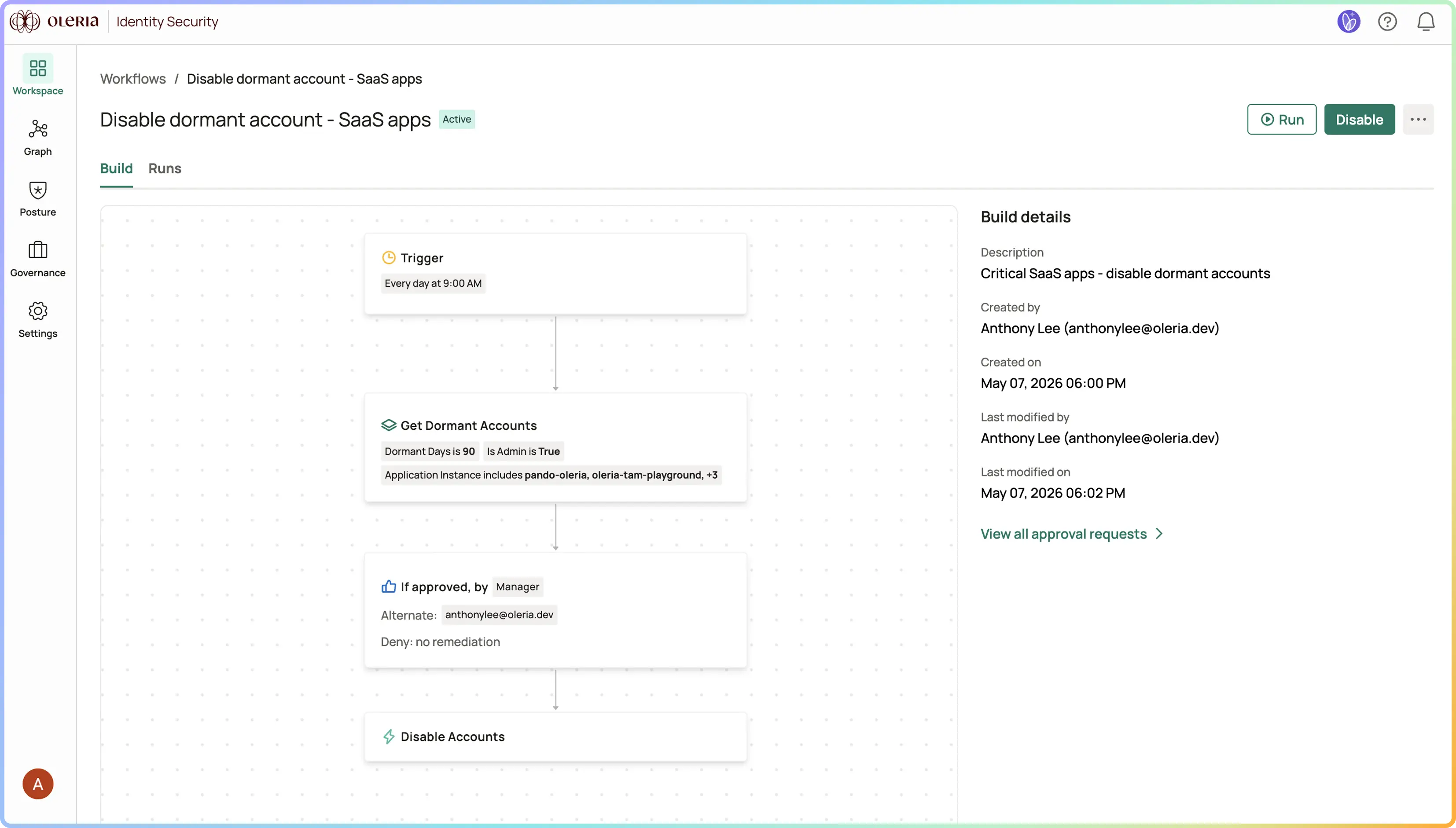
Every account inactive beyond your defined threshold - across cloud, SaaS, and on-prem - in one view, filterable by app, inactivity duration, and access scope.
Dormant accounts with admin scope or access to sensitive systems surface first. A dormant read-only account in a low-risk app is a different problem than a dormant admin account in your data warehouse.
Configure inactivity thresholds per app. When a threshold is crossed, Oleria triggers the disable workflow automatically - with owner notification, a grace period if configured, and a full audit trail.
Break-glass accounts, seasonal roles, and shared service accounts can be marked with documented exceptions. Everything else gets actioned.
You set a 60-day inactivity threshold for Salesforce, Snowflake, and GitHub. Oleria surfaces 214 dormant accounts across the three apps. Sorted by risk: 31 have admin or elevated scope. The workflow runs - owners are notified, accounts with no response after 7 days are disabled automatically. 180 accounts are disabled in the first cycle. The 34 that responded are either reactivated with documented justification or flagged as exceptions.
In the next quarterly access review, the dormant account category is empty. The review takes half the time it used to. Every disable is audit-logged with timestamp, trigger, and outcome - when compliance asks for evidence of least-privilege enforcement, it's already there.

An account with no recorded authentication activity within your configured threshold - typically 30, 60, or 90 days. Thresholds are configurable per app. A Snowflake account might warrant a 30-day threshold; a break-glass admin account might be excepted entirely.
The workflow includes an owner notification step with a response window before disable. If the owner responds and provides justification, the account is excepted with a documented approval. If there is no response, the disable proceeds automatically.
Yes. The dormancy workflow applies to both. NHI-specific dormancy patterns - service accounts, API keys, OAuth apps with no recent activity - are also surfaced. The risk calculus differs slightly for NHIs since they don't have a human owner to notify, but the detection and disable logic is the same.
Automated dormancy management directly supports least-privilege requirements in SOC 2, ISO 27001, and similar frameworks. Every disable action is audit-logged with timestamp, trigger, approver, and outcome - ready for auditor review without any manual evidence assembly.
Yes. Thresholds are configured per app, so a high-sensitivity system like a data warehouse can have a tighter threshold than a low-risk SaaS tool.