Quick Summary: Oleria MCP Server AI Integration lets IAM engineers query live identity context directly inside Claude, ChatGPT, or Cursor — no tool-switching required. Oleria, an AI-native identity security & governance platform, connects your AI assistant to the access graph through the Model Context Protocol in minutes.
Claude Desktop, Cursor, your own agents — connect them to Oleria's access graph through the Model Context Protocol.
Operators increasingly work with AI assistants — Claude Desktop, ChatGPT, Cursor, custom agents. Identity questions during that work require pivoting to a separate tool, copying data back, breaking flow. The AI assistant can reason about identity questions; it just can't see the data.
MCP (Model Context Protocol) is the emerging standard for connecting AI assistants to data sources. An identity tool with an MCP server lets the operator's AI assistant query the access graph in the same conversation where they're doing other work. Most identity tools haven't shipped MCP support; Oleria has.
Oleria MCP Server AI Integration surfaces live access graph data inside your preferred AI assistant — permissions scoped to your RBAC, every query logged.
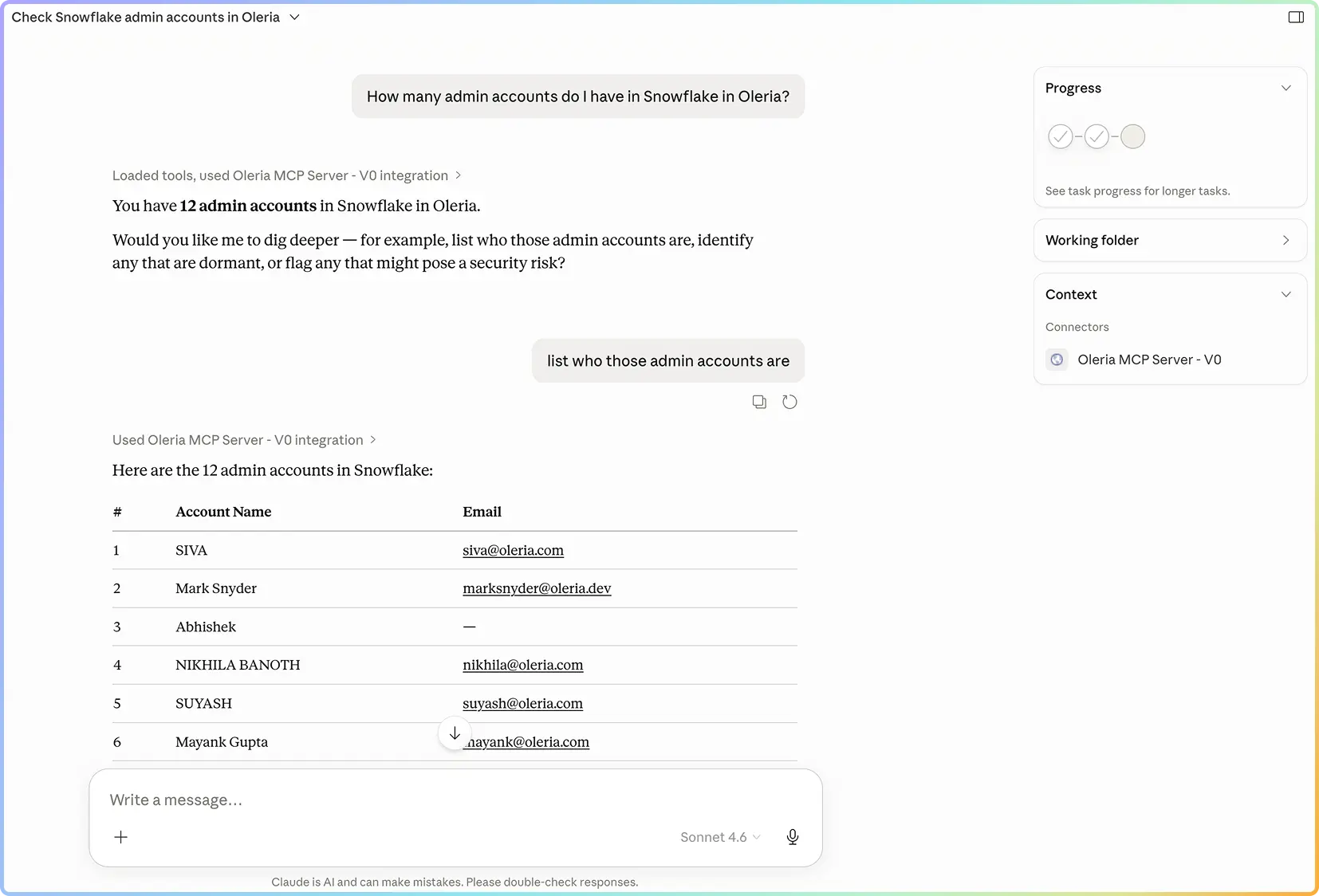
Standard MCP endpoints for querying identities, permissions, access paths, and activity. Compatible with Claude Desktop, Cursor, custom agents.
MCP server respects Oleria's RBAC. The connected assistant has the operator's permissions; nothing more.
What the MCP server can do, with examples for common workflows. Operators write effective prompts.
Every MCP query is logged with the operator and the connected client. Logs feed Oleria's audit pipeline.
Oleria's MCP server makes the access graph queryable from any AI assistant — under the operator's RBAC, with every query logged. Identity context shows up where the operator is already working.
Operators using Oleria via AI assistants From zero to common
Pivot from AI assistant to Oleria UI for identity questions Eliminated
Custom agent integration Days, not custom integration projects
AI workflow continuity Maintained

Model Context Protocol is the emerging standard (introduced by Anthropic, supported broadly) for connecting AI assistants to data sources and tools. An MCP-compatible AI assistant can query any MCP-compatible source as part of its conversation. For identity, this means the operator's AI assistant can query Oleria directly without breaking flow into a separate tool.
Read access to the identity graph: query identities, permissions, access paths, activity. Where the operator has action authority in Oleria, the MCP server exposes the corresponding action endpoints — but action authority is rarer; most use is read for investigation and analysis.
Through Oleria's RBAC. The MCP connection authenticates with an Oleria token tied to the operator's role. The assistant has exactly the operator's read access; nothing more. Every query is logged with the operator and the connected client.
Anything that supports MCP. Claude Desktop and Cursor are first-class. Custom agents built with major frameworks (LangChain, LlamaIndex, etc.) connect through MCP libraries. The standard means the integration work is one-time and source-agnostic.
An IAM engineer is debugging an access issue in their AI assistant. They ask the assistant to investigate; the assistant queries Oleria via MCP for the identity context; the answer comes back inline. The operator might continue the conversation: "now show me everyone in the same role," "what changed in the last 30 days," etc. No tool-switching.