Visibility
Posture
M365 Copilot
IAM Engineer

Find out exactly what your Microsoft Copilot integration can reach, who approved it, and whether it still needs that access

Quick Summary: Microsoft Copilot integrations inherit broad data access through Graph API permissions that few teams have fully reviewed or scoped. Oleria, an AI-native identity security & governance platform, maps every Copilot integration's access scope, approval history, and current usage so you know exactly what it can reach and whether that access is still justified.

Outcome

Microsoft Copilot doesn't just answer questions - it acts on your data, your emails, your files, and your calendar using the permissions of whoever deployed it. Most enterprises have dozens of Copilot agents and plugins running with scopes nobody reviewed and owners nobody can name. That's not an AI problem. It's an NHI problem.

The reality

Microsoft 365 Copilot is an NHI. Every Copilot agent, every plugin, every Graph connector authorized in your tenant is a non-human identity with credentials, permissions, and data access - governed (or not) exactly like a service account. The difference is that Copilot agents move fast, get deployed by business users who don't think of themselves as IT, and are authorized with admin or delegated permissions against your most sensitive data: email, SharePoint, Teams, OneDrive, Dynamics, and more.

The deployment model makes governance harder than with traditional OAuth apps. A Copilot agent can be deployed by a line-of-business team in an afternoon. It inherits the deploying user's Graph permissions or is granted application permissions directly. It may be connected to SharePoint sites, calendars, or CRM data the security team didn't know was in scope. And unlike a forgotten OAuth app, Copilot agents are actively used - which means their data reach is real and current, not theoretical.

Most organizations deploying Copilot today cannot answer three basic questions: which Copilot agents and plugins are authorized in our tenant, what data can each one actually reach, and who is accountable if one misbehaves. The Microsoft 365 admin center shows you Copilot usage telemetry. It doesn't give you a governed NHI inventory with owners, scope reviews, and a decommission workflow.

What you get with Oleria

Oleria treats every Copilot agent, plugin, and Graph connector as an NHI - inventoried, scoped, owned, and reviewed on the same cadence as your service accounts and OAuth apps.
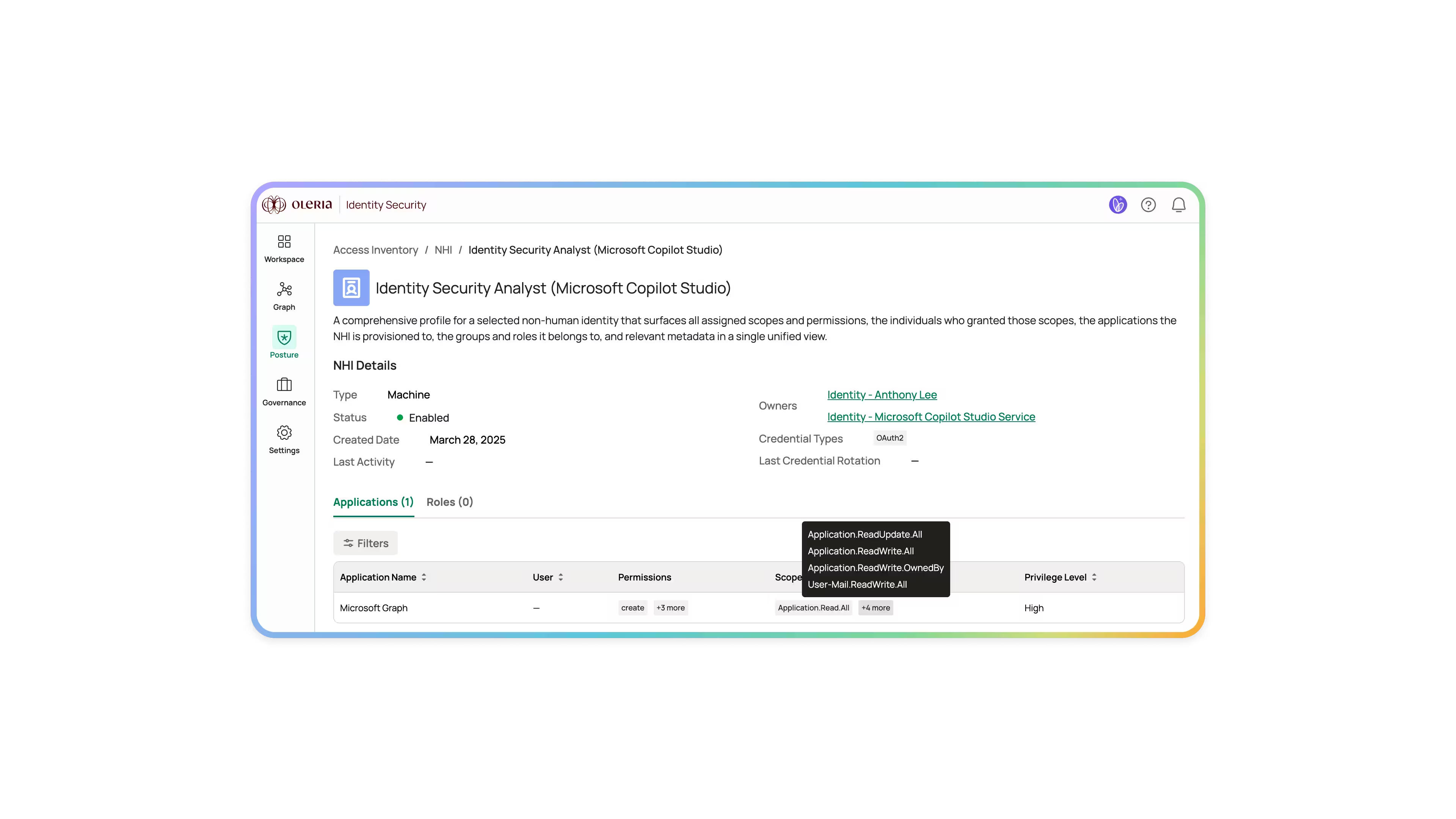
Copilot NHI inventory across your M365 tenant

Every Copilot agent, Copilot Studio bot, Microsoft 365 plugin, and Graph connector in one view - with the Graph permissions each holds, the SharePoint sites and data sources it can reach, and the identity that authorized it.

Effective data reach, not just theoretical scope

Oleria surfaces what each Copilot agent has actually accessed - which SharePoint sites, which mailboxes, which Teams channels, which OneDrive folders. The gap between "what it's permitted to do" and "what it's actually done" surfaces automatically. Agents with broad permissions and narrow actual usage are right-sizing candidates.

Owner attribution per agent

Every Copilot NHI gets a named owner - the team or individual accountable for its behavior, its scope, and its decommission when the use case ends. Without ownership, there's no accountability; without accountability, Copilot governance is a spreadsheet that goes stale.

Dormant Copilot NHIs surfaced

An agent deployed for a quarterly project and never decommissioned is an open credential against your data. Dormancy detection flags agents with no recent activity for cleanup on the same schedule as the rest of your NHI estate.

Outcomes at a glance

Copilot NHI inventory
Every agent, plugin, and connector
Effective data reach
What Copilot actually touches
Scope vs need
Overpermissioned agents flagged

How it works

  1. Connect - Read-only OAuth to your M365 and Entra tenants. Copilot agents, plugins, and Graph connectors surface in inventory within an hour.
  2. Ask - "Copilot agents with access to regulated SharePoint sites" or "plugins with application-level Graph permissions unused in 60 days."
  3. Review - Sort by data sensitivity, by privilege level, by owner status, by last-active date.
  4. Act - Assign owners, review scopes, detect dormant agents, or route to a security review workflow.

What Oleria delivers

Oleria's Microsoft Copilot Integration Security Governance treats every Copilot agent as an NHI — owned, scoped, and reviewed on the same cadence as your service accounts.

What it looks like in your environment

Your M365 tenant has been live with Copilot for six months. The security team runs Oleria's Copilot NHI inventory for the first time. They find 47 Copilot agents and plugins authorized across the tenant. Of those, 14 have access to SharePoint sites tagged as containing regulated data. 9 were deployed by line-of-business teams without a formal IT approval. 6 have had no activity in 60 days. 3 hold application-level Graph permissions - not delegated, not scoped to a user - with Mail.Read.All and Files.Read.All at tenant level.

The security team routes the 3 application-permission agents to immediate review. The 14 with regulated-data access get named reviewers assigned. The 6 dormant agents are surfaced for decommission. Two weeks later, the highest-risk Copilot NHIs have owners, the dormant ones are gone, and the remaining inventory is on quarterly review cadence - the same cadence as every other NHI in the estate.

What good looks like

  • Every Copilot agent and plugin in your M365 tenant has a named owner, declared purpose, and review date - the same governance standard applied to service accounts and OAuth apps.
  • Application-level Graph permissions held by Copilot agents are reviewed quarterly - Mail.Read.All, Files.Read.All, and Sites.FullControl.All at tenant scope are never anonymous.
  • Regulated-data exposure via Copilot is tracked and reviewable - the CISO can answer "which Copilot agents can reach our HIPAA data" without a multi-day investigation.
  • Dormant Copilot agents are decommissioned on the same cycle as the rest of your NHI estate - not discovered during an incident or a compliance audit.
  • Mean time from Copilot agent deployment to security team awareness: same day, not discovered weeks later when usage patterns raise a question.

See every Microsoft Copilot integration that can reach your data — before an auditor or attacker does first.

Oleria gives security teams complete visibility and governance over every Copilot agent, plugin, and Graph connector as a first-class NHI. Book a demo to see it live in your M365 environment.

Frequently Asked Questions

What is a non-human identity (NHI)?

A non-human identity is any credential or identity that authenticates to systems or data without a human directly logging in - service accounts, API keys, OAuth apps, machine tokens, and AI agents like Microsoft Copilot. NHIs typically outnumber human identities significantly in modern enterprises and carry significant data access with far less governance than human accounts.

How is this different from what Microsoft Purview or Defender for Cloud Apps already shows?

Purview focuses on data classification and compliance policy enforcement. Defender for Cloud Apps focuses on app risk scoring and usage analytics. Neither treats Copilot agents as NHIs with owners, review cycles, and lifecycle management. Oleria governs the identity behind the agent - who authorized it, what it can reach, who's accountable, when it should be decommissioned - which is a different lens from usage telemetry or data policy.

What about Copilot Studio agents built by business users?

Copilot Studio agents are some of the highest-risk Copilot NHIs precisely because they're deployed by non-IT users who don't think in terms of identity governance. They surface in the same inventory as centrally-deployed agents, with the deploying user attributed as the initial owner candidate and the data sources they connected flagged for review.

Does this cover Microsoft 365 plugins and third-party Graph connectors too?

Yes. M365 plugins and Graph connectors authorized in your tenant are inventoried alongside Copilot agents. They share the same data access model - Graph permissions, SharePoint access, and connector credentials - and get the same governance treatment.

How does Copilot NHI governance map to compliance requirements?

Copilot agents with access to regulated data (HIPAA, GDPR, PCI-DSS, SOC 2 in-scope systems) are subject to the same least-privilege and access review requirements as any other NHI touching that data. Oleria's evidence export covers Copilot agents in the same audit pack as the rest of the NHI estate - ownership records, scope reviews, and access history all included.

What if a Copilot agent needs broad scope to function correctly?

Broad scope with a justified, documented, and reviewed business reason is a managed exception - not a governance failure. Oleria's workflow captures the justification, assigns a named reviewer, and puts the agent on an accelerated review cadence. The difference between "we reviewed this and accepted the risk" and "we didn't know it existed" is the entire point.